The daily cash receipts report
Run this report at the end of the day to see what came in, by fee and by payment method, and to prepare the deposit. Administrators, land use staff and finance staff can open it. Find it from Reports, or from the link under the entries on Payments.
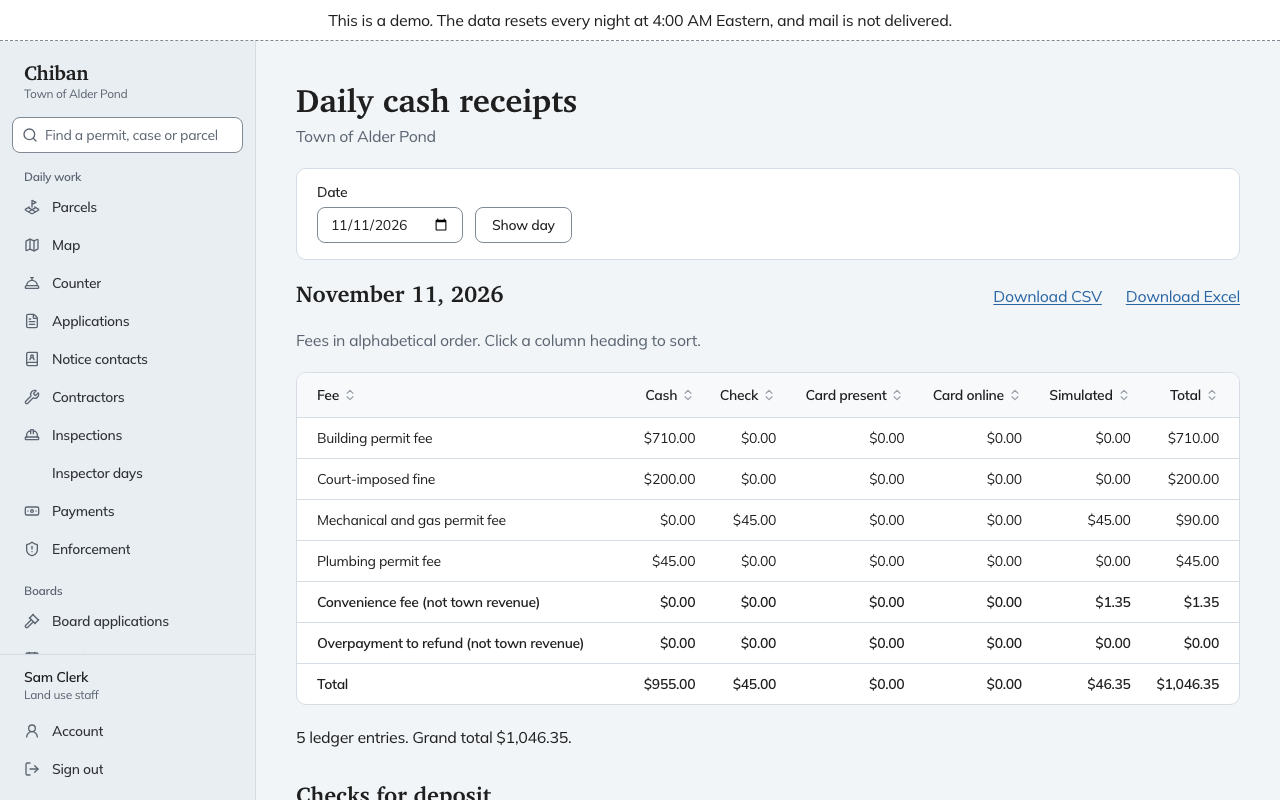
Choose the day
The page opens on today. Pick another Date and choose Show day. If no money was received that day, the page says so. Otherwise the download links Download CSV and Download Excel appear beside the date, and both cover the day you are viewing.
Read the fee table
Each row is a fee, in alphabetical order, with a column for each way it was paid:
- Cash and Check.
- Card present, a card used at the counter.
- Card online.
- Simulated, for practice payments.
- Total for the row.
A court-imposed fine has its own row. Below the fees are three rows in bold:
- Convenience fee (not town revenue).
- Overpayment to refund (not town revenue).
- Total.
The first two are not fee revenue, so keep them out of the town fees you report. Under the table are the number of ledger entries and the grand total.
Refunds, returned checks and chargebacks entered that day show as negative amounts in the column of the original payment. A refund of a check payment, for instance, reduces the Check column. The report follows the date of the entry, not the date of the original payment.
Checks for deposit
Checks for deposit lists each check taken that day, in the order taken, with its Check number, Payer and Amount. A check that was later returned says "Returned, recorded" with that date under the payer. Click a column heading to sort either table.
Use the list to prepare the bank deposit slip. The report cannot show what was actually deposited or when the bank received it.
Printing
The page prints cleanly, without the date picker or the download links.