A working day for land use staff
This guide follows Sam Clerk, the clerk in the Alder Pond demo, who holds the land use staff role. Sam takes applications at the counter, issues permits, collects fees, assigns reviewers, draws abutter lists and answers questions about any parcel. If you hold the same role, your menu and your buttons match what is described here. Roles that hold only part of this work, such as inspectors or finance staff, see fewer pages. How the staff roles fit together explains the split.
Start on Today
Signing in opens Today. The date is at the top, with a Find a parcel box under it. Type an address, an owner or a parcel ID and the result is the parcel page. Below that are panels, one for each kind of work you can do.
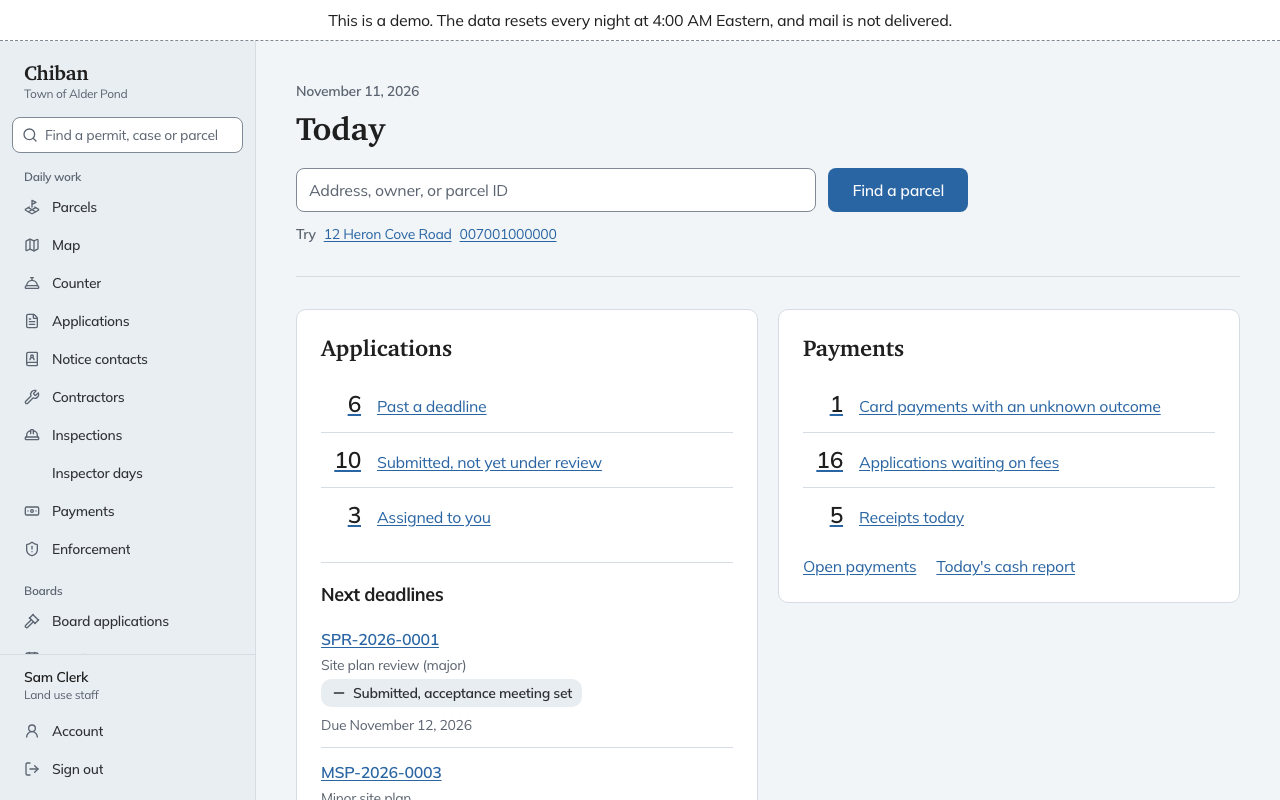
For land use staff the panels are:
- Applications: how many are Past a deadline, Submitted, not yet under review, Reviews back, ready to decide and Assigned to you. Under the counts, Next deadlines lists the applications whose clocks run out soonest. Choose a count to open the Applications list already filtered to those records.
- Payments: card payments with an unknown outcome, applications waiting on fees, and receipts taken today, with a link to Today's cash report.
- Records, Inspections, Enforcement and Board packets: counts of Right-to-Know requests, inspection requests to schedule, enforcement cases and packets not yet sent.
A row with a count of zero is hidden, and a panel with nothing in it says Nothing waiting. The panel with the most urgent first row comes first. Each count is a link, and the page it opens shows the same number.
The menu
The Daily work group in the left menu is where most of the day happens:
| Menu entry | Use it to |
|---|---|
| Parcels and Map | Find a lot and see everything open on it. See Parcels, the map and search. |
| Counter | Take a walk-in or a paper application and the fee in one visit. See The counter. |
| Applications | Work the list of everything in the office. See The Applications list. |
| Notice contacts | Keep the people who get mailed notice besides the owner. See Notice contacts and abutter lists. |
| Contractors | Look up contractors who have set up a profile. See Contractors and license checks. |
| Inspections, Inspector days and Enforcement | Scheduling, inspection results and code cases. See the inspector guide and the enforcement guide. |
| Payments | The ledger, receipts and the daily cash report. |
The Boards group holds board applications, meetings, board members and packets. Records and reports and Parcel data are collapsed groups that open when you choose them.
The box at the top of the menu, Find a permit, case or parcel, works from every page. See Parcels, the map and search.
A typical day
- Open Today. If Past a deadline has a count, open it first.
- Take the people at the counter as they arrive. A permit that can be issued on the spot is done in one form. Everything else is taken and sent on for review. See The counter.
- Work the Applications list from the top. Each record says whose move it is and what the next step is. See From intake to issued permit.
- Take payments as they come in and print what the applicant needs. See Fees, waivers and payments and Printing a permit or placard.
- Before you close, check Payments on Today for card payments with an unknown outcome.
What land use staff cannot do
You will not see buttons for these, because other roles hold them:
- Refunding, voiding or correcting a payment belongs to the administrator and finance roles.
- Recording a statutory exception, which clears a requirement that comes from state law, belongs to the administrator.
- Changing forms, fee schedules, templates and who holds which role is done under Settings by the administrator.
Roles and permissions lists every permission and who has it.