Notice contacts and abutter lists
When a board application needs mailed notice, the notice goes to the abutters of the lot. For most parcels that is the owner of record on the assessing file. A few kinds of parcel are different: a condominium's notice goes to the association's officers, a manufactured housing park's goes to the park owner, and a lot under a conservation restriction also notifies the holder. Notice contacts is where you keep those people, and an abutter list uses them when it is drawn.
Notice contacts
Open Notice contacts. The tabs sort the contacts by kind:
- Associations are condominium associations. Notices for a condo parcel go to the association officers, not the unit owners.
- Parks are manufactured housing parks. Notices go to the park owner. Each tenant is listed, and you decide for each application whether the tenant's home is adjoining or across.
- Restriction holders are holders of conservation and preservation restrictions. When an applicant's land carries one of these, the holder is notified.
- Missing association lists condo parcels with no association on file. An abutter list that touches one of these cannot be issued until its association is added.
- Regional and state lists the regional and state contacts used when an application has regional impact. Administrators change these under Settings.
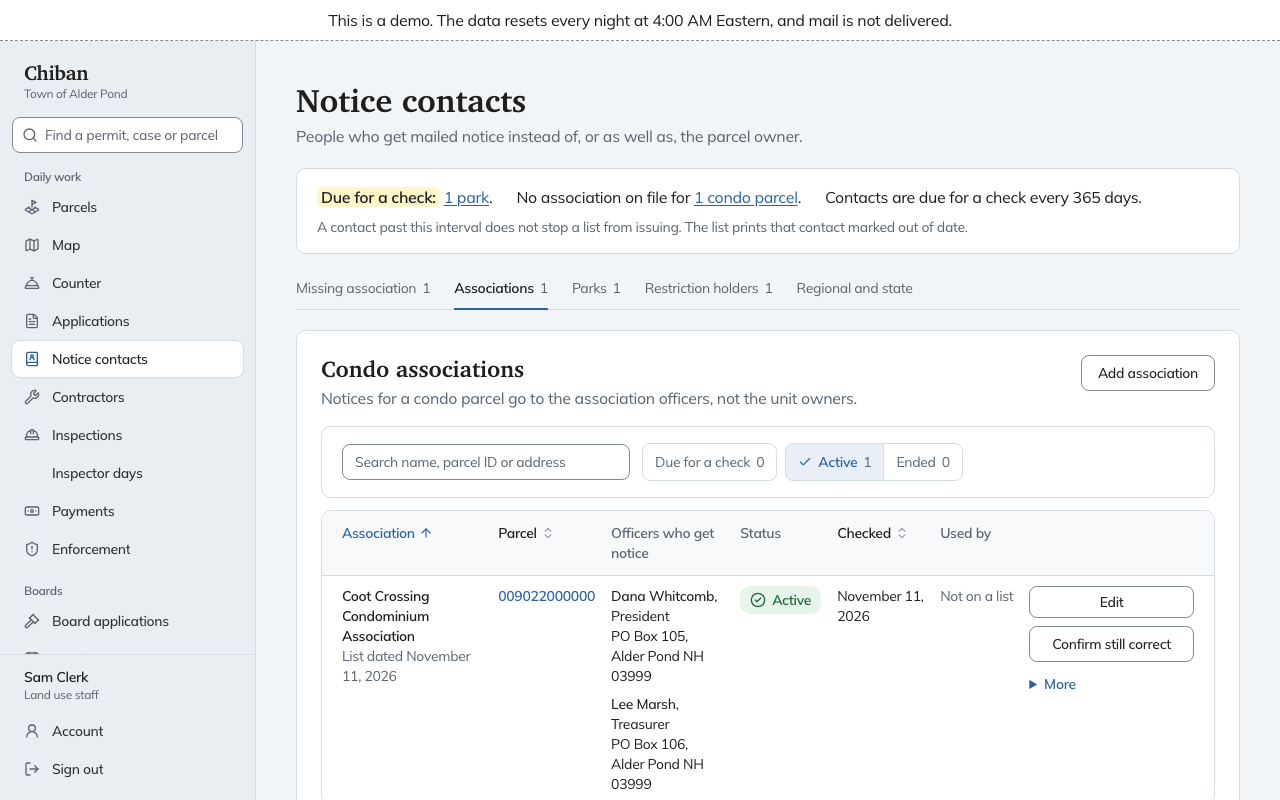
Each tab has a search box (Search name, parcel ID or address), a status filter (Due for a check, Active, Ended) and an add button: Add association, Add park or Add holder. Choose the parcel the contact belongs to and fill in the name and the mailing address. An association also takes the date its list is current as of. A row's Edit changes it, and End retires it with an end date, which Undo ending reverses.
Keeping contacts current
Each contact has a Checked date. Choose Confirm still correct when you have checked a contact against what you know, and the date moves. A contact is Due for a check when its date is older than the interval shown on the page. Alder Pond's is 365 days, and an administrator can change it. A contact past the interval does not stop a list from issuing. The printed list marks that contact as out of date.
For restriction holders there is also Record a check next to the line saying when the land records were last checked, so the office can show that it looked.
Abutter lists
An abutter list belongs to a board application. You draw it from the application's record, and the hearings page covers mailing the notice.
- Open the board application and find Abutter lists in the board panel. If the application needs a list, Do this now may say so, and once a draft exists it offers Open version and the draft's number to issue it.
- Choose Draw a new list. Chiban reads the parcel, road and water layers, picks out the parcels that touch the lot or sit across a street or stream, and adds the people who must receive notice. It starts at Version 1 as a draft.
- Open the version to review it.
If the application involves more than one lot, use Add a parcel to this application first. If a surveyor, engineer, architect or soil scientist's seal is on the plat, use Add a professional whose seal is on the plat, because that person receives notice too.
Reading a list
The page for a list has these parts, top to bottom:
- Before this list can be issued appears when something is missing, such as an association, with a link to fix it.
- Across the street or stream is a map that shows how Chiban found the parcels across a road or a stream. Every parcel on the map is also in the tables.
- Parcels considered lists each parcel, its owner on record, and why it is on the list, for example Touches the property or Across Osprey Point Road, between the projected points.
- Who receives notice lists each person with their mailing address, the role they receive notice as, such as Abutting owner, Applicant, Easement or restriction holder or Professional whose seal is on the plat, and where the information came from.
- Where the data came from says when each layer was last imported and whether it is out of date.
Fixing a list
A draft is yours to change before it is issued.
- Leave off beside a parcel removes it from the list. A reason is required and is kept with the list.
- Add a parcel across a street or stream adds a parcel Chiban missed. Choose the parcel, whether it is across a Street or a Stream, and explain Why it belongs on the list.
- Confirm streets and streams were reviewed records that you checked the crossings.
- Correct the name or address changes a recipient's name or mailing address, with a reason.
- Decide whether this tenant counts records, for a park tenant, whether they own housing that adjoins or is directly across.
Issuing and printing
When the list is right, choose Issue list and confirm. Issuing works out the cost of the mailed notice from the number of mailings and replaces any earlier issued list. It cannot be undone. A new list can be drawn later, which becomes the next version.
An issued list shows a Check code that matches every printed copy of that version. Print mailing labels offers two sheets, Avery 5160 and Avery 5163, as PDF files.
The cost shows under Notice cost on the list and as a Mailed notice to abutters line on the application's fees. The applicant owes it, and it is paid like any other fee. See Fees, waivers and payments.
On a Planning Board application the list must be drawn within five days of filing, and the record's requirements say so. Deadlines and holidays lists the notice rules Chiban tracks.
Land use staff and administrators keep the contacts, draw lists and issue them.