Board applications, from filing to acceptance
This page is for the board secretary and for planning and zoning staff. It follows one application before the Planning Board or the Zoning Board of Adjustment from the day it is filed to the day the board accepts it, and shows which deadlines start on the way.
Everything here needs the permission to record board business, which land use staff and administrators have. See how the staff roles fit together.
Finding the applications
Open Boards, then Board applications. The page lists every board application that is submitted, under review or decided, oldest filing first, with one table for each board that decides applications.
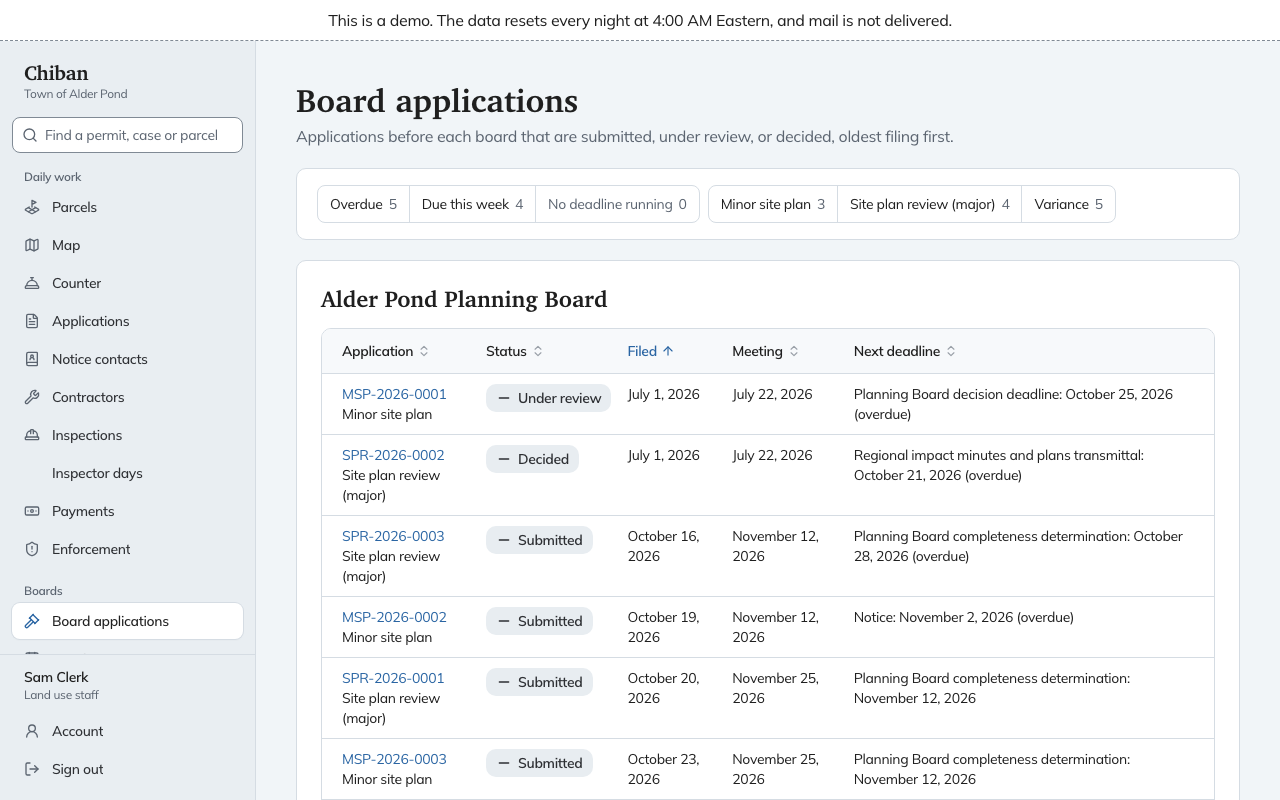
Each row shows the application number and type, its status, the date it was filed, the meeting it is set for and its Next deadline. A deadline that has passed says "overdue" beside it.
Three filters sit above the tables.
- Overdue lists applications with a deadline that has passed.
- Due this week lists the ones with a deadline in the next seven days.
- No deadline running lists applications that have no clock running at the moment.
The type filters beside them narrow the tables to one application type. The Conservation Commission and the Historic District Commission only comment, so they have no table. Under each of them, Sent for comment lists the applications staff have asked the commission about, and whether comments have come in.
Open an application to work on it. Its page puts the next thing to do under Do this now, lists what is done and not done under Requirements, and shows each running deadline under Clocks.
From filing to acceptance at the Planning Board
An application starts in the Submitted status once it is filed. For a Planning Board application, three things happen before the board can vote on it. Staff set the meeting where it will be considered, record the regional impact and water body findings, and issue the abutter list. The Requirements list on the application shows which of these are done.
1. Set the meeting
Under Filing and acceptance, choose the Meeting and select Set the meeting. Each upcoming meeting in the list is marked with what that date would mean for this application:
- meets the deadline, when the board can vote in time;
- after the deadline, when the meeting is later than the completeness deadline;
- too soon to mail notice, when there is no longer time to mail notice before that date;
- filed too late for this meeting, when the applicant filed after the last day to be placed on that meeting's agenda.
An applicant has to file a set number of days before the meeting. Chiban works out that last filing day from the meeting you choose and shows it as the Planning Board filing deadline before the acceptance meeting. If the application was filed after that day, Chiban refuses the meeting. It tells you the last day to file and the earliest meeting the application can go to.
A meeting that is after the deadline can still be chosen, but Chiban warns you that it is after the deadline. When a meeting on or before the deadline would still work, the button changes to Move the meeting with that meeting already chosen. When none would work, the warning says why, for example that there is not enough time left to mail notice for any meeting on or before the deadline.
2. Record the regional impact and water body findings
Under Regional impact and water bodies, record whether the project has regional impact. Choose No regional impact, Regional impact or Previously determined by another board. For regional impact, tick the affected municipalities. If another board decided it earlier, enter that board's reference. Select Record determination.
Below it, Chiban measures from the parcel to the nearest water body and suggests whether the NH DES notice applies. Choose an answer under Record the NH DES determination. If your answer differs from what the map suggests, or you choose that the notice does not apply, write a reason. The map measures from the parcel, not the building site, so use your own judgment where they differ.
Both findings change who gets notice, and regional impact lengthens the decision period. Record them before you draw the abutter list. If you record or change either one after a list was issued, Chiban asks you to draw and issue a new list before a hearing can be scheduled.
3. Issue the abutter list
Under Abutter lists, draw a list and open it to review who receives notice. Issuing it fixes that version. The list page shows the notice cost for the mailings, which is collected under the application's fees and payments. Hearings cannot be scheduled until a list has been issued.
You can also add other parcels to the application, and record a professional whose seal is on the plat, choosing whether that person is sent notice.
If the applicant does not pay the notice costs, End this application for unpaid notice costs closes it. It asks for a reason.
4. Schedule the hearing
On a Planning Board application that has just been submitted, the hearing is a Submission and public hearing. Scheduling it also sets the meeting for acceptance. The next page, hearings and notice, covers it.
5. Record the completeness vote
The vote form opens once the meeting has taken place. Until then the page tells you to come back after the meeting.
Under Filing and acceptance, open Record the completeness vote and fill in:
- Date of the vote, which cannot be earlier than the meeting or later than today.
- Outcome, either Accepted as complete or Not accepted as complete.
- Reason, if not accepted, which is required when the board did not accept the application.
Select Record vote and confirm.
When the board accepts the application, it moves to Under review, its stage becomes Hearing, and the completeness deadline is marked met. The clock for the board's decision starts that day. When the board does not accept it, Chiban records the reason and closes the application as not accepted. Check the outcome before you confirm, since it is recorded as the board's vote.
If a requirement is still blocking the application, such as the abutter list, the form only offers the not accepted outcome, and the Requirements list says what is missing.
From filing to acceptance at the Zoning Board of Adjustment
The Zoning Board of Adjustment has no completeness step. Under Hearing, choose the Hearing meeting and select Set the meeting. Record the regional impact and water body findings, and issue the abutter list, the same way as above. Once the meeting has taken place, Open the hearing records the board's vote with the outcome Accepted for hearing or Not accepted.
Scheduling a hearing for a submitted variance application, from the Hearings and decisions section, also opens the hearing and moves the application to Under review.
The deadlines that start
These clocks run on board applications. They are explained, with the days they run and how Chiban counts them, in New Hampshire deadlines and holidays.
| When | The deadline that starts |
|---|---|
| The application is received | The Planning Board completeness determination, or the ZBA hearing deadline and the ZBA decision deadline |
| A meeting is set | The filing deadline before the acceptance meeting, and the notice deadlines for that meeting |
| The board accepts a Planning Board application | The Planning Board decision deadline |
| The board votes on a decision | The minutes and written decision filing deadline, and the appeal periods |
Adding or cancelling a regular meeting recalculates the dates that depend on it. Staff who may extend or waive a clock can do so under Adjust this clock on the application, where the rule allows it.
What staff see coming due
- The Today page lists the next deadlines across all applications, and counts how many applications are past a deadline.
- Board applications shows the next deadline on each row and filters to overdue and due this week.
- The application shows the clock with its due date, the days left or the days overdue, how the days were counted and what happens if it is missed.
- The Board packets card on Today shows how many packets for upcoming meetings have not been sent yet.