What applicants see
Applicants and contractors have their own inspections page, with less on it than yours. Knowing what it shows helps you answer their calls.
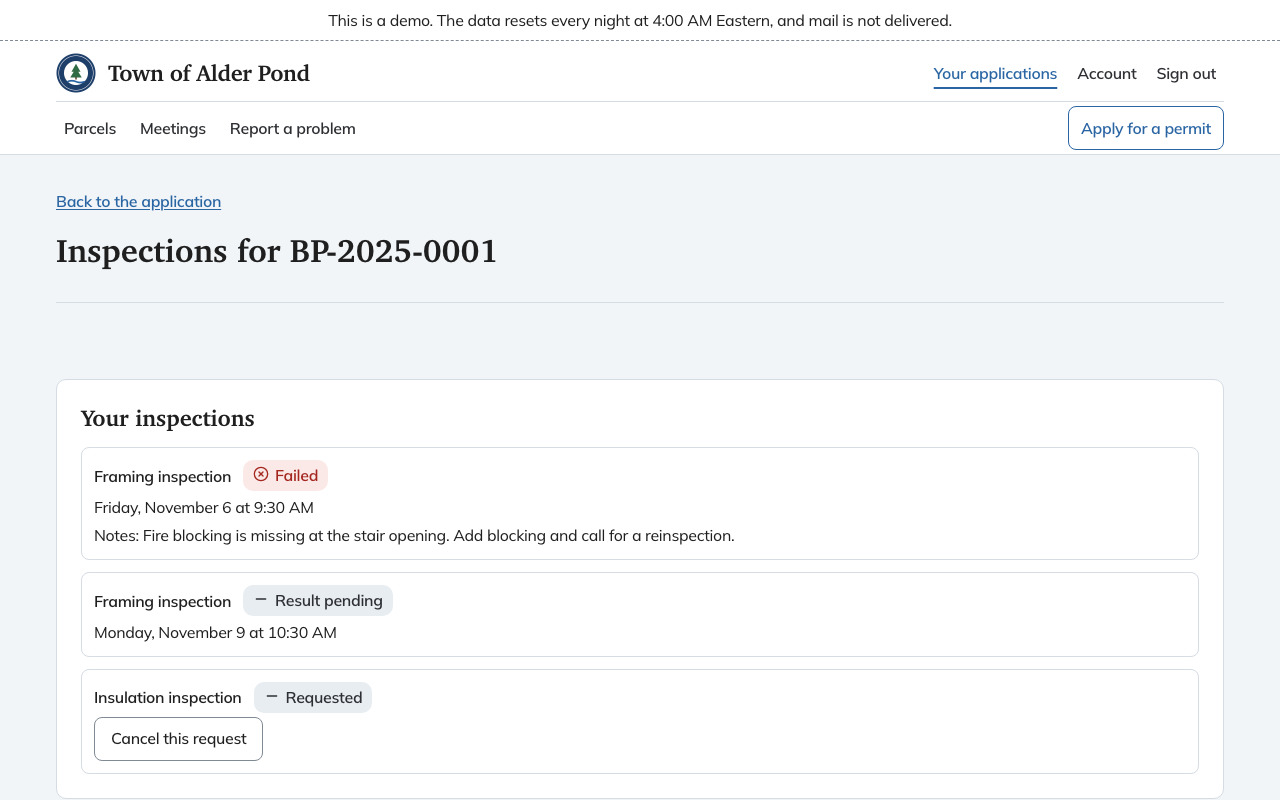
Their list
Your inspections shows one row per inspection with a status:
- Requested once they ask for it.
- Scheduled, with the day and time, once you book it.
- Result pending once the date has passed with no result recorded.
- Passed or Failed once you record it, with your Notes for the permit holder.
- Cancelled.
They do not see the checklist, the item-by-item outcomes, your photos or the inspector's name. Your notes are all they get, so write them for someone who was not at the site.
What they can do
- Request an inspection, choosing the type, a preferred day, a contact and access notes. The days offered are the days the town inspects. The request waits on your board marked Portal.
- Cancel this request on a request they made online, while it is still requested or scheduled. Inspections the office took by phone or at the counter are not theirs to cancel.
- Request a reinspection on a failed inspection that has none yet.
They can request only when the permit is issued and not under appeal. Under appeal the page says Inspections are paused while this permit is under appeal.
An administrator can turn online requests off. The page then says Online requests are turned off and gives the office's phone hours. Staff keep taking requests by phone and at the counter. See scheduling inspections.
Emails
When you book or cancel an inspection, or record a result, the people on the permit receive an email. The scheduling email says someone should be at the site.