Failed inspections and reinspections
After a failed inspection the contractor fixes the problem and asks for another look. Chiban links the two inspections so you arrive at the reinspection knowing what failed.
What a failed inspection looks like
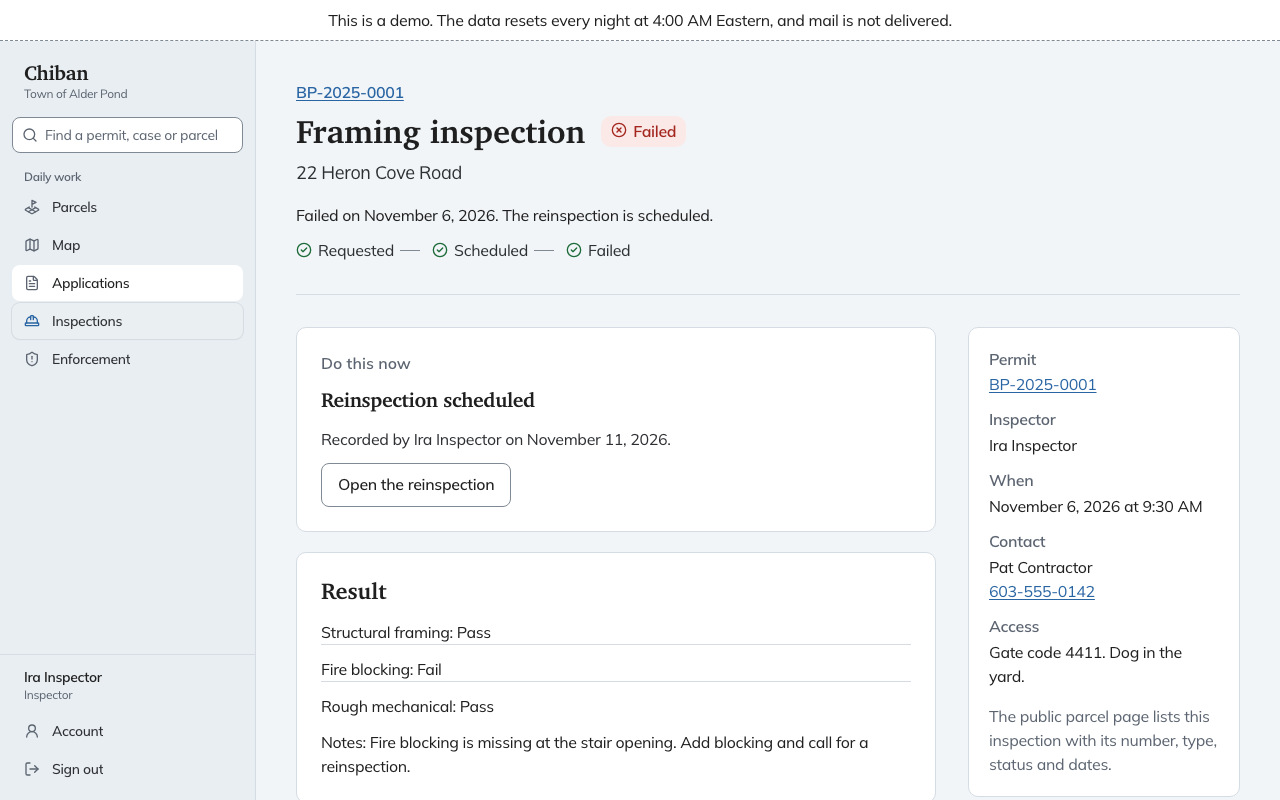
The inspection page shows Failed with the date, the Result section listing each item as Pass or Fail, your Notes, and the photos you attached.
Requesting the reinspection
The Do this now card on a failed inspection reads Request the reinspection. Choose it and Chiban opens the request form on the schedule board with the permit and the failed inspection filled in. Only the type that failed is offered. Take the request and book a time as you would for any other. See scheduling inspections.
Applicants and contractors can ask for the reinspection themselves from their inspections page. See what applicants see. Either way the request waits on the board marked Reinspection.
A few rules apply:
- Only a failed inspection can be inspected again.
- A failure has one reinspection at a time. While one is requested or scheduled, the failed inspection's card says Reinspection requested or Reinspection scheduled, with Open the reinspection.
- If the reinspection fails too, the newer failure is the one that gets the next reinspection.
Arriving at the reinspection
On My day and on the reinspection itself, a Last time note repeats what you wrote when the first inspection failed. The reinspection's page links back to The failed inspection, and its progress starts at Reinspection requested.
The checklist and the way you fill it in are the same. See recording a result.
A failed final
A failed final does not close the permit or start a certificate. The permit stays open until a final inspection passes.