The Payments page and receipts
Payments shows the money that has moved through the town's books. Land use staff, administrators and finance staff can open it from the staff menu.
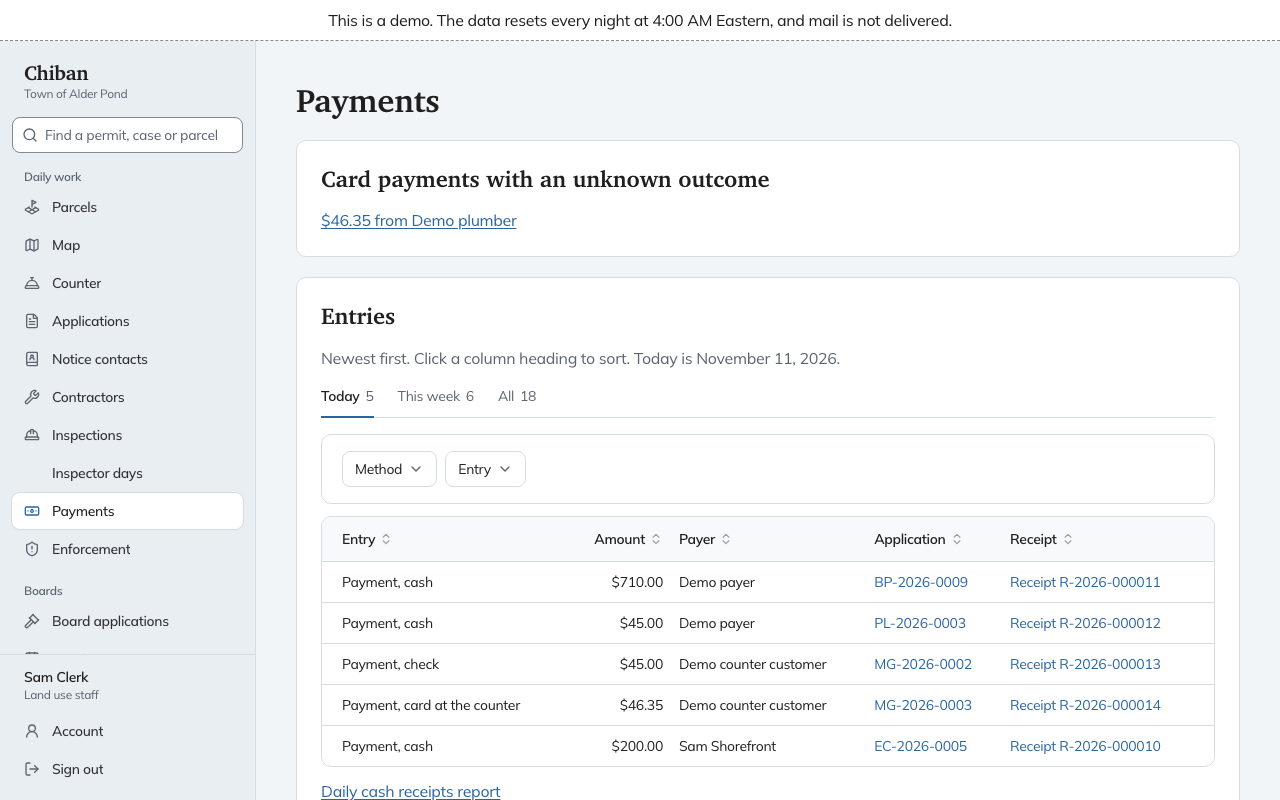
Card payments that need attention
Card payments that need a person are listed at the top, above the entries:
- Card payments with an unknown outcome, where Chiban could not tell whether the card was charged.
- Anomalies, where the card processor reported something that does not fit what Chiban expected, shown with a short reason.
- Overpayment to refund, where an applicant paid more than the fees due. Each row links to the application.
When none of these applies, the page says "No card payment needs attention." Open a card payment from its row to see what happened and what to do. See Card payments.
Entries
Entries lists every payment, refund, returned check, chargeback and correction, newest first. The tabs Today, This week and All show the count in each. The Method and Entry filters narrow the list, and each column heading sorts it.
A row shows the kind of entry and how it was paid (cash, check, card at the counter or card online), the amount, who paid, the application it belongs to and the receipt. A court-imposed fine links to its enforcement case instead of an application.
You cannot take a payment or a refund from this page. To take a payment, open the application and use Take a payment under Fees and payments. Refunds are done there as well. See Refunds and corrections.
Receipts
Every payment and every refund gets a receipt with its own number, such as R-2026-000011. The number runs in order within the year. Choose a receipt on a row, or on the application, to open it as a PDF in a new tab.
A receipt shows the receipt number, the date, who paid, the method, the total and what the payment covered. A cash payment also shows the amount tendered and the change. A refund receipt is titled Refund receipt and says Refunded to. A receipt for a practice payment carries a notice that no card was charged.
An administrator can change the receipt layout and wording in the "Payment receipt" template under Settings, Templates. The receipt footer and the name checks are payable to are under Settings, Card payments.
Only staff who can see every record can open a receipt. An applicant sees their own payments, and a receipt for an online card payment, on the payment confirmation page.