Archival copies
For many record series, Chiban makes an archival PDF/A copy of each document, so the record can still be opened in the future. A document with a scan or a damaged file sometimes cannot be converted. The Preservation page lists those documents so you can fix or retry them. Land use staff, administrators and records custodians can open it.
Read the list
The page, titled Preservation incomplete, has a row for each document, giving the problem, how many times Chiban has tried and a Retry button. The title links to the record, and Download the file opens the stored file.
The problem is one of these:
- The file could not be converted to an archival PDF.
- The converted file did not pass the archival format check.
- Converting the file took too long.
- The scanned image could not be converted to a searchable PDF.
- Reading the scanned image took too long.
If none fits, the row says the archival copy could not be made. Technical detail under the problem has the converter's own message, which is useful if you ask whoever runs the server for help.
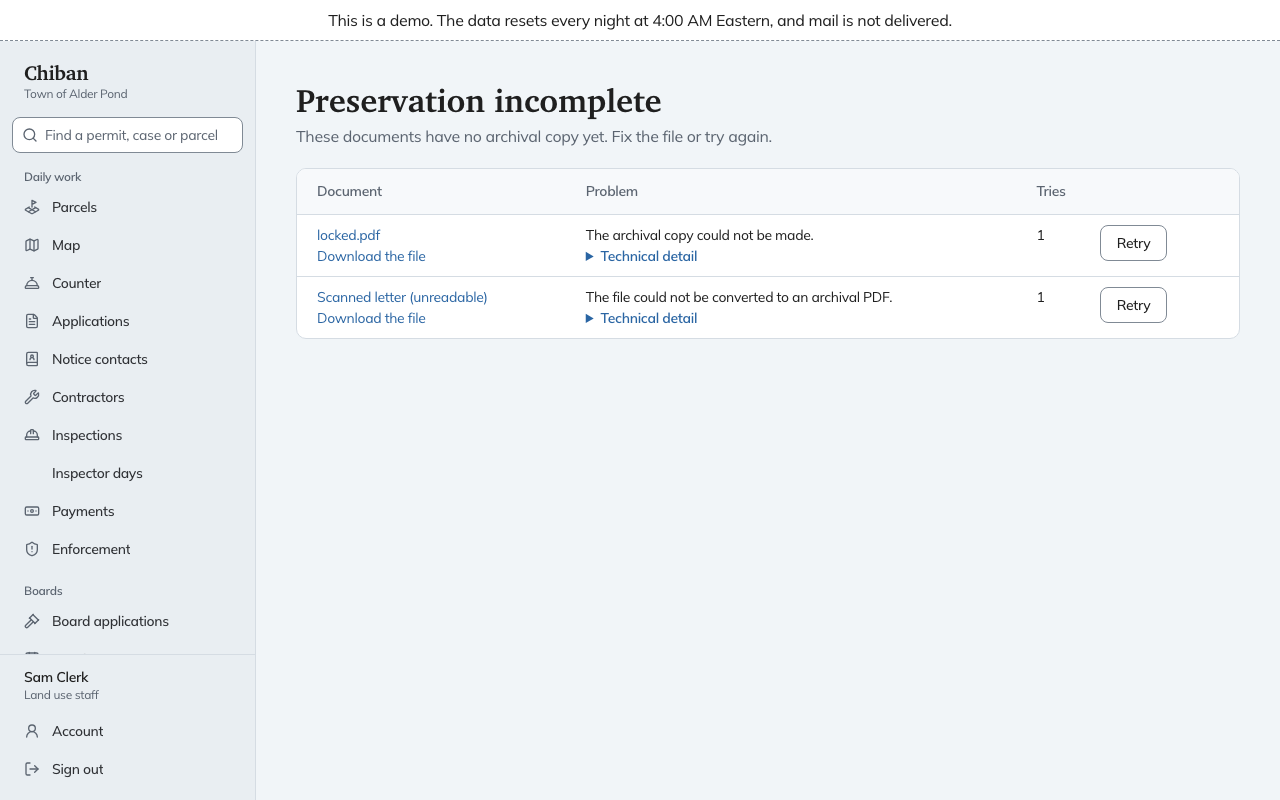
Fix and retry
Download the file and look at it. A password-protected PDF or an unreadable scan will not convert. Attach a good copy to the record if you can get one, then choose Retry. Chiban says it will try again within a minute. Documents waiting for that next try appear under Waiting to be tried again and leave the list once they are preserved. If the retry fails, they come back to the top list.
The same Retry preservation button is under Manage on the document in its record. When the page reads "Every document that needs an archival copy has one", there is nothing to do.
Documents that need no archival copy, for example some correspondence, are labeled Preservation not required in the record.