Serving an order, answers and deadlines
After an order is issued, the town has to show that the right people were served. Chiban keeps a checklist of who has to be served, records each service with its proof, and counts the answer period for each person from the day they were served.
Who has to be served
The order's service checklist covers these roles: Owner of record, Owner agent, Taxpayer, Occupying tenant, Person in control of the property and Mortgagee of record. For each role you either list the people to be served or record that there are none. The checklist shows Service is complete only when every role is settled and every listed person has been served.
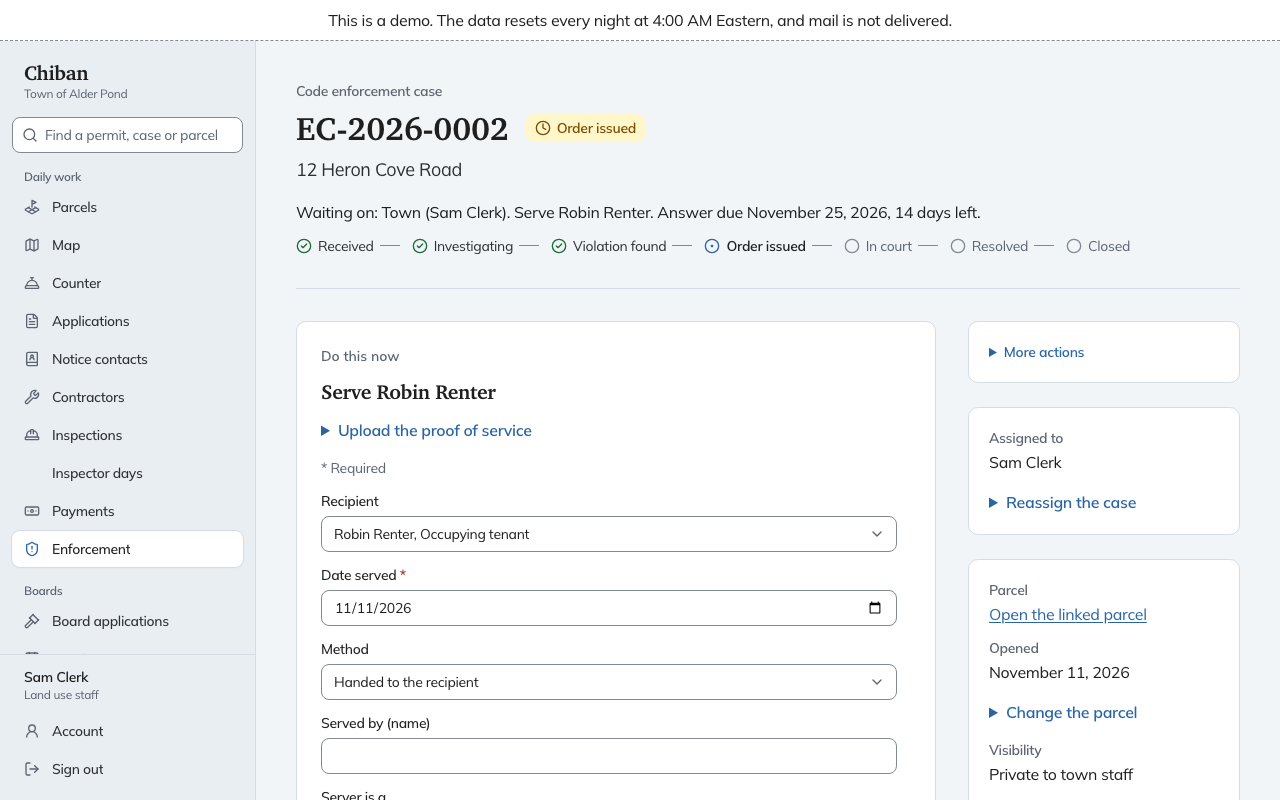
Do this now names one gap at a time: Record the check for the role, List the role, Serve a named person, or finish posting and publication.
Record the check for a role
Open Record the check for a role. Pick the Role, then a Result:
- Recipients listed: people exist, and you will add them.
- None exist: nobody holds that role. For example, no mortgagee.
- Same as the owner: the taxpayer or agent is the owner.
- Owner could not be found: for the owner of record only. It opens the way to posting and publication.
Add What was searched and Date checked. This is the town's record of the effort.
Add a recipient
Choose Add a recipient. Give the Role, Name, Address, and where the name came from, such as the town's assessing data, a registry book and page, or a site visit.
Record service
Choose Record service under the order, or follow Do this now. Fill in:
- Recipient, or No one person: posting or publication for a posting or a newspaper notice.
- Date served.
- Method: Handed to the recipient, Left at the place of abode, Other method allowed for a civil summons, Posted on the property or Published in a newspaper.
- Served by, with their name and what they are: Sheriff, Deputy sheriff, Local police officer, Constable or Other. Hand delivery needs a sheriff, deputy, local police officer or constable.
- Proof of service, an uploaded document.
Upload the proof first with Upload the proof of service, then choose it in the form. Proof is a return of service, an affidavit of posting, or a newspaper tear sheet. Chiban will not record service without it.
Posting and newspaper publication are allowed only after the owner is marked Owner could not be found. They are repeated until the checklist shows Posting and publication complete with a date. The order's Service events list shows each event with a link to its proof.
Answer periods
Under Answer periods, each served person has a line with the day they were served, the last day to answer, and how many days are left or how long ago it passed. The page prints the counting rule it used, including how a last day on a weekend or holiday moves to the next business day. The earliest running period shows in the Due column of the case list and in Do this now, as Wait for the answer.
If someone answers, open Record an answer. Choose Who answered, the Date received and the document. An answer means the town cannot ask the court to enforce the order itself. Do this now then says Refer the case to town counsel, because counsel takes an answered order to court. See court, counsel and penalty exposure.
When the owner appeals to the zoning board
If the owner appeals to the Zoning Board of Adjustment, open Record an appeal under the appeals section. Choose What is appealed (the order or the notice of violation), enter the Appellant and Date filed.
While the appeal is open the case shows Stayed, and Do this now reads Wait for the ZBA decision with a warning that enforcement is stayed. During a stay you can still add notes, photos, service and answers. You cannot issue an order, file the motion to enforce or record a fine. The list's Appeal stay column shows which cases are stayed.
When the board decides, record the decision with Decision (Upheld, Modified, Annulled or Withdrawn) and Date decided. The appeals section also has forms to certify imminent peril, record a restraining order, and mark a stay dissolved.