Working through import exceptions
An import never stops for a bad row. It sets the row aside, finishes the rest, and lists the row on the Exceptions page, under Parcel data in the staff menu. Open it after any import that reports exceptions.
You need the permission to manage parcels to apply or dismiss an exception, which administrators and land use staff have. Other staff who can see parcel records can read the page.
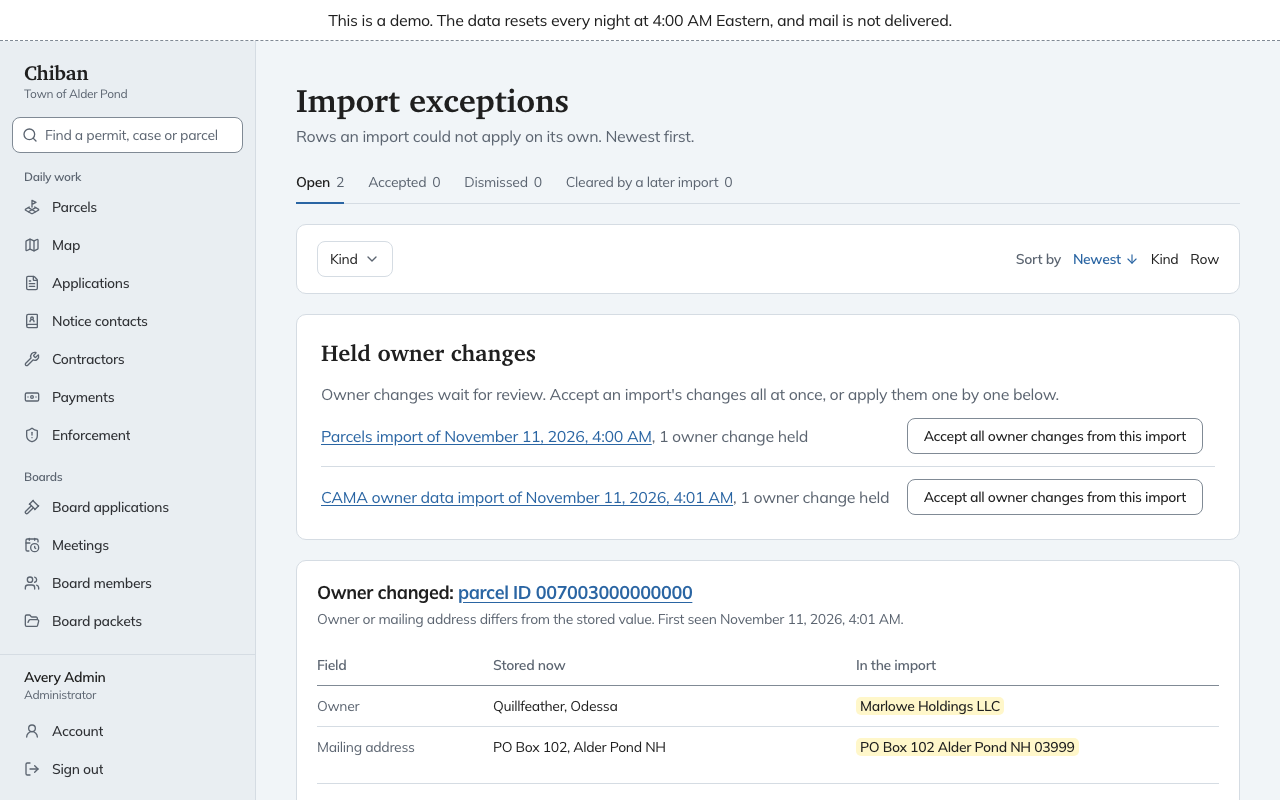
Reading the page
The tabs show Open, Accepted, Dismissed and Cleared by a later import, each with its count. The work is in Open. The Kind filter narrows the list to one reason, and Sort by reorders it. Each card names the reason and the parcel or row, says when it was first seen, and shows the values side by side: Stored now and In the import.
An exception clears itself when a later import no longer has the problem. You do not need to close it by hand after fixing the source and loading again.
The kinds
| Reason on the card | What happened | What to do |
|---|---|---|
| Shape is not valid | The outline crosses itself or is otherwise broken | Fix it in the GIS source and load again |
| No shape | The feature has no outline | Fix the source and load again |
| Required field is empty | The parcel ID column is blank | Fill it in at the source |
| Parcel ID in the wrong format | The ID does not fit the town's ID format | Correct the ID at the source |
| Parcel ID lost its leading zeros | The ID arrived as a number, so 007001 became 7001 | Export the ID as text, or set the layer's mapping to pad it |
| Parcel ID belongs to a retired parcel | The ID matches a parcel that was merged or subdivided away | See parcel lineage, or correct the ID |
| Parcel ID belongs to another parcel | The ID is already in use on a different parcel | Find which parcel is right, then fix the source |
| Parcel ID is set by an override | Staff set this ID by hand, so imports will not change it | Decide whether the override is still right before loading again |
| Owner changed | The file names a different owner or mailing address from the one stored | Apply it or dismiss it, see below |
| Missing from the new layer | A parcel Chiban has is not in the full layer you loaded | Check whether the parcel was retired or dropped by mistake |
| Owner record matches no parcel | A row in the assessing file names a parcel Chiban does not have | Load the parcel layer first, or dismiss it |
Owner changes
An owner or mailing address that differs from what Chiban holds is never written over silently, because abutter notices go to those addresses. The card shows the stored value and the new one.
- Apply the change accepts the new owner and mailing address.
- Accept all owner changes from this import, under Held owner changes at the top, accepts every change from one import at once. Use it when the assessing office's file is the authority and you have looked it over.
- Dismiss leaves the stored value alone.
Dismissing
Choose Dismiss, give a Reason (for example why the stored value is right) and confirm. The exception leaves the open list with your reason recorded. The parcel data stays as it was. If a later import hits the same problem again, it raises a new open exception.