Linking unresolved records to parcels
Records you bring in from old systems name a parcel by its ID. Sometimes that ID is not in Chiban: the parcel layer has not been loaded yet, the ID was typed wrong in the old ledger, or the lot was split years ago. Chiban keeps the record anyway and parks it on the Unresolved records page, under Parcel data in the staff menu, until it can be linked.
You need the permission to manage parcels, which administrators and land use staff have.
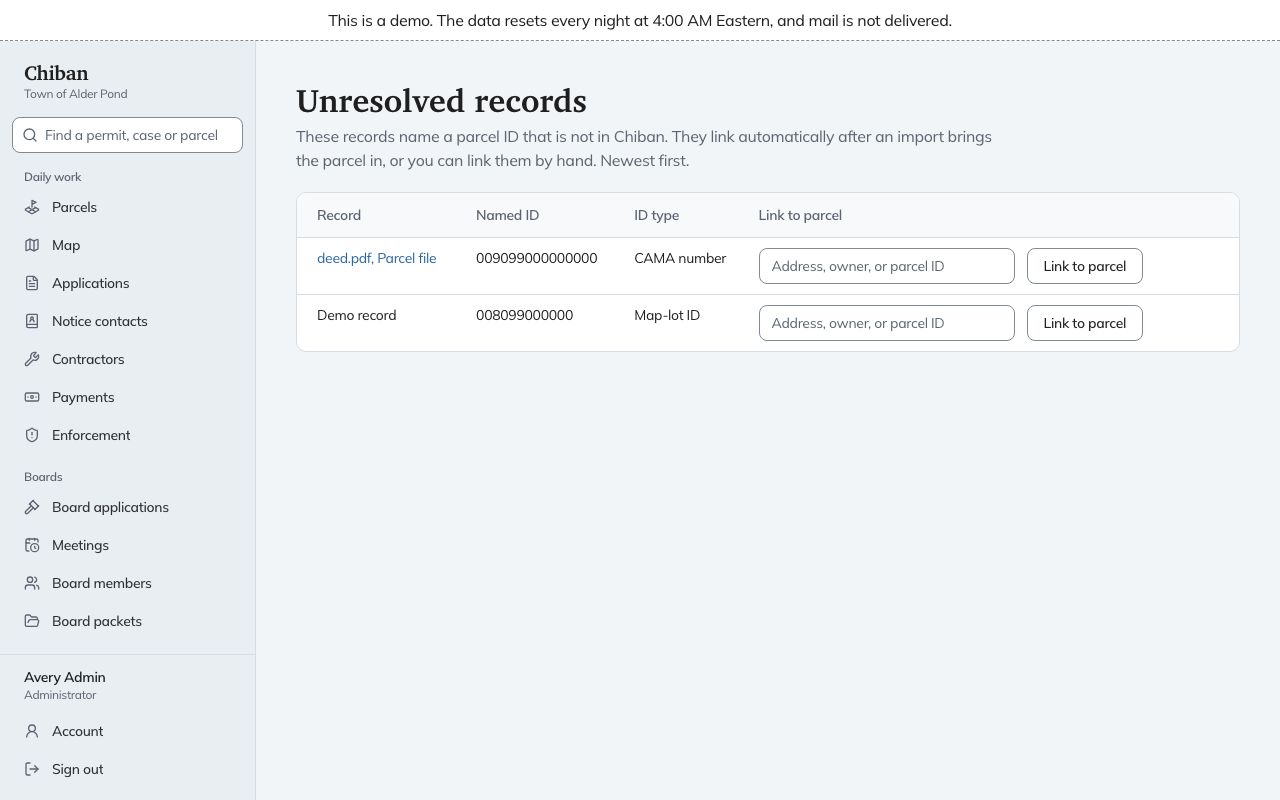
Where unresolved records come from
- Rows of an old permit ledger whose parcel ID matches no parcel.
- Files in a batch of scanned property files whose parcel was not found. Those stay private.
Reading the page
Each row has the Record, which links to the record itself, the Named ID it asked for, and the ID type, such as Map-lot ID or CAMA number. Newest first. When nothing is waiting, the page says "Every record is linked to a parcel."
They often fix themselves
When an import of the parcel layer brings in a parcel whose ID matches a record's named ID, the record links to it on its own. If the list is long right after setup, load the parcels first and look again before working through it by hand. See GIS layers.
Linking one by hand
- In the last column, start typing an address or ID in the parcel box and pick the parcel from the list.
- Choose Link to parcel.
The page says "Record linked", and the record joins that parcel's history.
Check the named ID before you link. If it has a typo, linking by hand fixes this one record and not the other records that carry the same typo. For those, correct the source and load again.