Reporting a possible violation
Anyone can tell the town about work that may not follow the zoning ordinance or building code. You do not need an account. Choose Report a problem at the top of any page.
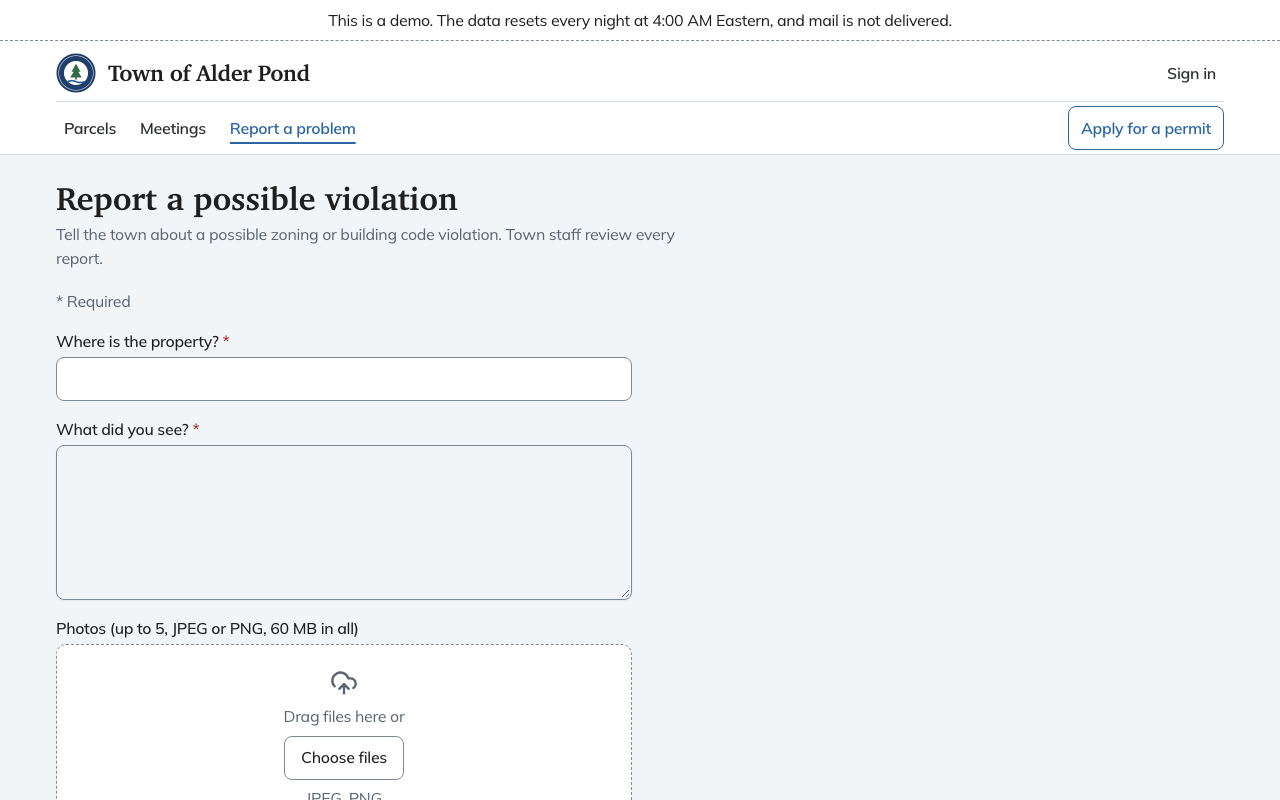
The report form
- Where is the property? Required. An address or a description is enough.
- What did you see? Required, up to 5,000 characters.
- Photos. Up to five JPEG or PNG files, 60 MB in all. Drag them in or choose Choose files.
- Your name, Your email and Your phone. All optional. Only town staff see them.
Choose Send report. The next page says "Thank you. The town has your report" and shows a reference such as CP-2026-0001. Keep it if you want to ask about the report later.
That page also says what happens next. Town staff review every report and decide whether to look into it further. If you gave an email or phone, staff may contact you with questions. If you left both blank, they cannot reply to you.
Anonymous reports
Some towns also take reports with no way to identify you, on a separate page. Each town turns this on itself, and Chiban only allows it after the server passes a check. When it is off, the page says "Anonymous reports are not available" and points you to the regular form. The demo has it off.
When it is on, the anonymous form has the same location, description and photo boxes and no contact fields. It warns you that anything you type or attach may identify you, and suggests leaving out your name, your address and details only you would know. Photos have their location and camera data removed before they are saved. After you send it, the page says the town does not know who sent it, so it cannot reply.